
Change Your Exness Partner Link
Already have an Exness account? You can switch your partner link to EAFree to start earning Premium Points from your trading activity — without opening a new account.
Open the Exness chatbot
Log in to your Exness account, open the support chatbot, and send the message: "I want to change my partner". The bot will open a partner-change request form.
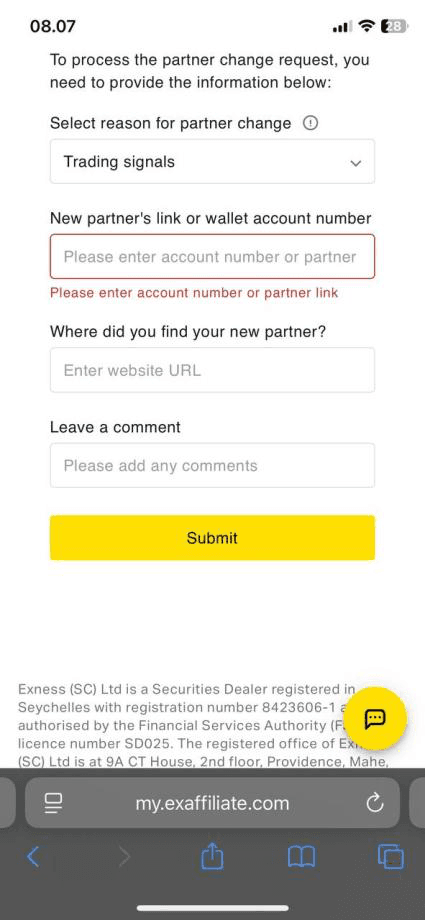
Fill in the partner-change form
In the form that appears:
- Select reason for partner change: Trading signals
- New partner's link or wallet account number: paste our partner link below.
https://one.exnessonelink.com/boarding/sign-up/373368/a/eafreeLeave all other fields blank
Do not fill in "Where did you find your new partner?" or "Leave a comment". Leaving them empty keeps the request simple and avoids delays.
Submit the request
Click the yellow Submit button at the bottom of the form. You should see a confirmation that your request has been received.
Wait 1–3 days for the confirmation email
Exness reviews the request manually. Within 1–3 business days you will receive an email confirming that your partner has been changed.
Open new MT4/MT5 accounts after the email
Once the confirmation email arrives, open a new MT4 or MT5 trading account from your Exness dashboard. Only trading accounts opened after the confirmation email will count under our partner and earn you EAFree points.
Existing accounts do not transfer
Trading accounts opened before the confirmation email will stay under your previous partner. Only new MT4/MT5 accounts opened after the email count toward EAFree points.
All set?
Once your partner change is confirmed, head back to the main guide to link your Exness account and start earning points.